The Live Operating System for

Update Exhibit Stories in Seconds, Not Months.

HeritageOS empowers curatorial teams to publish instant, multi-lingual audio guides for physical exhibits—with zero app downloads required for visitors.

Google Cloud Infrastructure Powered by Google Cloud

Built on Google Cloud infrastructure, HeritageOS delivers lifelike speech synthesis and instant translation in over 40 languages, ensuring every story reaches every visitor naturally and reliably.
01

Instant App-Free Access

Simple Visitor Access: Visitors rarely want to download mobile apps during a museum visit. HeritageOS provides instant access to exhibit audio and information through a standard mobile web page without asking visitors to create an account.

Automatic Language Detection: The system recognizes the language settings on a visitor's phone and automatically displays content in their language when the page opens.

02

Accessible & Inclusive Design

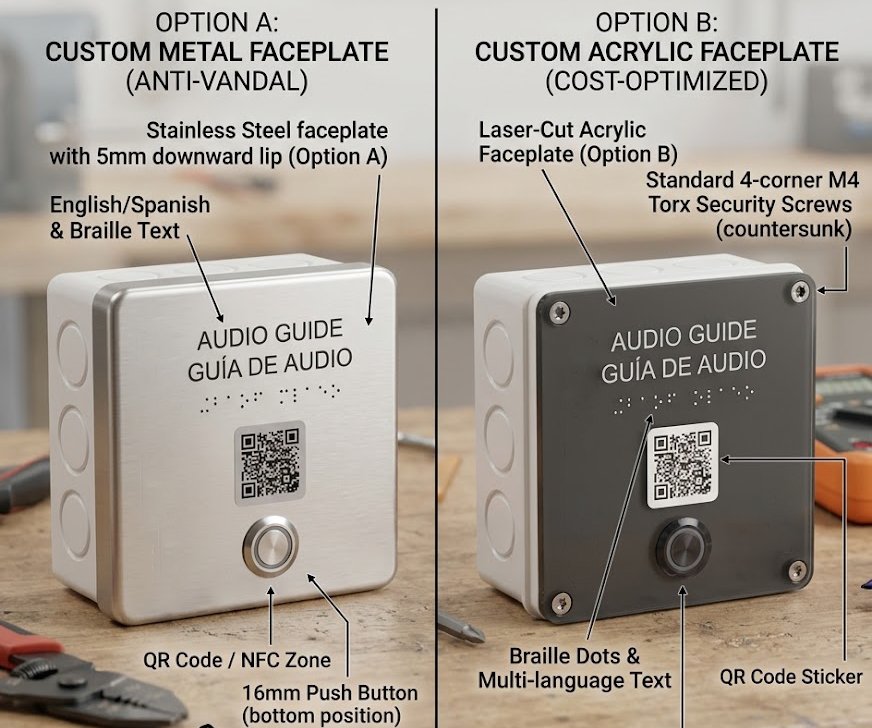
Inclusive Experience: HeritageOS includes physical touch features designed for visitors with varying accessibility needs. Visitors who are blind or low-vision can interact with raised Braille plaques and simple audio prompts to navigate exhibits independently.

Meeting Accessibility Standards: Designed in compliance with global accessibility guidelines, helping your institution remain welcoming, dignified, and accessible to every visitor.

03

Privacy Protection & Data Ethics

Complete Visitor Privacy: HeritageOS respects visitor privacy and follows strict international data protection standards. Institutions and visitors maintain full ownership of their information, with clear options to manage preferences in our Privacy Policy.

Transparency and Trust: Our ethical approach gives museum leadership confidence in data compliance, while giving visitors peace of mind that their privacy is protected.

How Visitors Launch Your Audio Guides

HeritageOS supports two options for starting audio guides: Unpowered and Powered triggers.

Unpowered Triggers use QR codes and simple tap-to-play (NFC) technology. We supply high-resolution PNG and PDF files that you can print directly as QR stickers using your office printer, or share with your local signage vendor to craft custom acrylic or steel plaques with embedded NFC tags tailored to your display space, color scheme, and building codes.

Powered Triggers offer advanced accessibility and physical interaction options tailored to your venue's layout. Depending on the installation location—indoor galleries or outdoor trails—units can be equipped with steel Braille plates, physical push buttons, capacitive touch surfaces, proximity sensors, Wi-Fi, Bluetooth, QR codes, and NFC tap-to-play. These specialized units can be ordered directly from HeritageOS at a moderate cost (view pricing).

How Visitors Launch Your Audio Guides

Trigger Type How It Is Provided Key Features Cost Level
Unpowered (Office Print) Printed in-house using provided PDF/PNG files QR Code No extra cost
Unpowered (Signage Vendor) Made by your local sign supplier QR Code + Tap-to-Play (NFC) Local vendor rates
Powered Triggers Purchased directly from HeritageOS Steel Braille + Touch / Push Button + Sensors (NFC, QR, Wi-Fi, Bluetooth) Moderate (View Pricing)

Unpowered (Office Print)

How Provided: Printed in-house using provided PDF/PNG files

Key Features: QR Code

Cost Level: No extra cost

Unpowered (Signage Vendor)

How Provided: Made by your local sign supplier

Key Features: QR Code + Tap-to-Play (NFC)

Cost Level: Local vendor rates

Powered Triggers

How Provided: Purchased directly from HeritageOS

Key Features: Steel Braille + Touch / Push Button + Sensors (NFC, QR, Wi-Fi, Bluetooth)

Cost Level: Moderate (View Pricing)


Explore Live Interactive Demonstrations

Try the Live Interactive Demo

Experience how instant exhibit updating works. Print or scan a test QR code with your smartphone to hear your customized exhibit audio immediately—no app needed.

See Interactive Demo →

Operational Dashboard

Explore real-time visitor engagement reports, language preferences, and exhibit feedback inside the central management panel.

View Operations Panel →

For Your IT & Legal Team

Explore our transparent data framework, designed to protect visitor privacy while meeting international regulatory standards.

View Privacy Framework →

Interested in Customizing HeritageOS for Your Museum?

We are passionate about museums and cultural heritage. If you would like to bring this experience to your institution or learn more about our curator dashboard, please share your official details below. We will get in touch with you shortly.

Know More →